Make Your Front Door Smarter With a Schlage Encode Plus Smart Lock
Your front door is one of the most important entry points in your home. Keeping it secure while making everyday access more convenient is something many homeowners want.
Traditional keys work, but they can be inconvenient when you need to give someone temporary access, check whether your door is locked, or manage access for family members.
This is where a smart door lock can make a difference.
The Schlage Encode Plus Smart WiFi Deadbolt is designed to combine traditional deadbolt security with smartphone control and keyless entry.
The specific model covered in this article is BE499WB-CEN-622, featuring a Century design and Matte Black finish.
Let’s explore its features and what you should know before buying.
What Is the Schlage Encode Plus Smart WiFi Deadbolt?
The Schlage Encode Plus is a connected deadbolt that allows homeowners to manage their front-door access through the Schlage Home app.
It includes built-in WiFi, a touchscreen keypad, and compatibility with selected smart-home platforms.
Its main features include: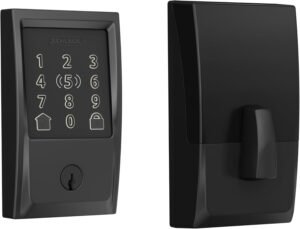
- Built-in WiFi connectivity.
- Keyless entry through a touchscreen keypad.
- Capacity for up to 100 access codes.
- Apple Home Key support.
- Apple HomeKit compatibility.
- Amazon Alexa and Google Assistant compatibility.
- Remote lock and unlock through the Schlage Home app.
- Lock activity history and customizable notifications.
- One-touch locking.
- Adjustable auto-lock functionality.
- A physical backup key.
- Built-in alarm technology.
The exact features available through connected services may depend on your phone, smart-home setup, software, and network connection.
1. Keyless Entry Makes Everyday Access Easier
One of the main reasons to consider the Schlage Encode Plus is its touchscreen keypad.
Instead of relying entirely on a physical key, authorized users can enter a personalized access code.
This can be useful for:
- Family members who need regular access.
- Trusted visitors.
- Guests who need temporary access.
- People who prefer not to carry a traditional key.
The lock supports up to 100 access codes, giving homeowners flexibility when managing access.
You can create, manage, and remove codes through the Schlage Home app.
This feature is especially useful when you want to provide access without distributing additional physical keys.
2. Control Your Door From Your Smartphone
The Schlage Encode Plus includes built-in WiFi connectivity.
When connected to a compatible home WiFi network and configured with the Schlage Home app, it allows you to lock or unlock your door remotely.
For example, you may want to: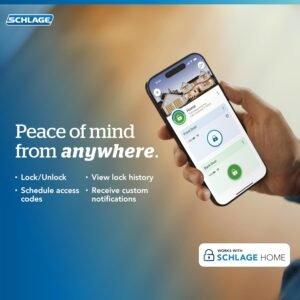
- Check your lock status while away.
- Lock the door after leaving home.
- Manage access codes.
- Review lock activity.
- Receive notifications about lock activity.
Because WiFi is built into the lock, a separate WiFi adapter or hub is not required for basic Schlage app connectivity.
Remote access depends on an active internet connection and the correct app configuration.
3. Apple Home Key: Unlock With Your iPhone or Apple Watch
One of the standout features of the Encode Plus is its Apple Home Key support.
Compatible iPhone and Apple Watch users can use Apple Home Key to lock or unlock the door by tapping their device at the lock.
This provides an alternative to entering a keypad code or carrying a physical key.
The lock also supports Apple HomeKit features, including compatible smart-home controls and Siri functionality.
However, remote connectivity and automations through Apple HomeKit require a compatible Apple home hub.
Check Apple’s current device and software compatibility requirements before purchasing.
4. Create Personalized Access Codes
Managing access to your home can become complicated when several people need to enter.
The Schlage Encode Plus supports up to 100 customizable access codes.
This gives homeowners the ability to create separate codes for different authorized users.
For example:
- A permanent code for family members.
- A separate code for a trusted visitor.
- Temporary access for someone who needs it for a limited period.
You can manage codes through the Schlage Home app.
Always remove access codes when they are no longer needed and only share them with people you trust.
5. Auto-Lock and One-Touch Locking
Sometimes people leave home in a hurry and forget to lock the front door.
The Schlage Encode Plus offers an adjustable auto-lock feature.
You can configure the lock to relock automatically after a selected time delay, depending on the available settings.
It also supports one-touch locking from the exterior touchscreen.
These features can make everyday door management more convenient.
Remember to check the door is properly closed and aligned so the deadbolt can operate correctly.
6. Built-In Alarm Technology for Added Awareness
The Encode Plus includes built-in alarm technology designed to sense certain door movements and potential forced-entry attempts.
This provides another layer of awareness around your front-door security.
The lock also offers a secure, encrypted connection and a fingerprint-resistant touchscreen.
These features are intended to support secure access management, but no smart lock can guarantee complete protection against every possible security issue.
Proper installation and a suitable physical door and frame remain important.
7. Does It Work With Alexa and Google Assistant?
The Schlage Encode Plus supports compatible Amazon Alexa and Google Assistant devices.
Depending on your configuration, you can use voice commands for supported smart-lock functions.
This can be useful if you already have a smart-home setup and want your door lock to work alongside other connected devices.
Check the current compatibility requirements and available commands before purchasing.
Is the Schlage Encode Plus Right for Your Home?
This smart deadbolt may be worth considering if you:
- Want keyless entry at your front door.
- Prefer managing access codes through an app.
- Use an iPhone or Apple Watch.
- Want built-in WiFi connectivity.
- Need remote lock and unlock functionality.
- Already use compatible Alexa or Google Assistant devices.
- Prefer a combination of keypad access and a physical backup key.
However, it may not be the right choice if:
- Your door is not compatible with its installation dimensions.
- Your WiFi network does not meet its requirements.
- You do not need smartphone or smart-home features.
- You prefer a simple traditional deadbolt.
- You use a smart-home platform that is not supported.
What to Check Before Buying the BE499WB-CEN-622
Before ordering the specific product in this article, check the following:
1. Exact model
Confirm that the listing is for BE499WB-CEN-622, the Century design in Matte Black.
2. Door compatibility
The manufacturer lists compatibility with standard door thicknesses of 1-3/8 to 1-3/4 inches. Check your door measurements and backset requirements.
3. WiFi requirements
The lock requires a compatible 2.4GHz WiFi network.
4. Smartphone compatibility
Check the current Schlage Home app requirements and Apple Home Key compatibility if you plan to use those features.
5. Battery requirements
The lock uses four AA alkaline batteries. Check battery condition periodically and pay attention to low-battery notifications.
6. Installation
Schlage describes the installation as a screwdriver-based process without hardwiring. Follow the manufacturer’s installation instructions and ensure the deadbolt moves freely.
7. Smart-home compatibility
Confirm that your existing devices and preferred smart-home platform support the functions you want to use.
Where to Buy the Schlage Encode Plus Smart WiFi Deadbolt
If you want to upgrade your front door with keyless entry and smartphone access, the Schlage Encode Plus is worth exploring.
Check the Amazon listing for current availability, package contents, warranty information, and customer feedback.

Make sure the listing matches the exact model and finish before placing your order.
Frequently Asked Questions
Does the Schlage Encode Plus require a separate WiFi hub?
No. It includes built-in WiFi for connectivity through the Schlage Home app. Apple HomeKit remote connectivity and automations require a compatible Apple home hub.
Can I unlock the Schlage Encode Plus with my iPhone?
Yes. It supports Apple Home Key on compatible iPhone and Apple Watch devices.
How many access codes can the lock store?
The Encode Plus supports up to 100 access codes.
Does the Schlage Encode Plus work with Alexa?
Yes. It supports compatible Amazon Alexa devices and services.
Does it work with Google Assistant?
Yes. The lock supports compatible Google Assistant devices and services.
Does the Schlage Encode Plus need batteries?
Yes. It uses four AA alkaline batteries.
Can I still use a physical key?
Yes. The lock includes a traditional key cylinder as a backup access option.
Does it support 5GHz WiFi?
The manufacturer’s specifications list a 2.4GHz WiFi requirement.
Final Verdict: Is the Schlage Encode Plus Worth Considering?
The Schlage Encode Plus Smart WiFi Deadbolt brings together keyless entry, smartphone control, Apple Home Key, customizable access codes, and smart-home compatibility.
Its strongest selling point is the combination of built-in WiFi and flexible entry options.
For homeowners who want to manage front-door access through a smartphone or keypad, it offers a convenient smart-lock solution.
Before buying, make sure your door is compatible, your WiFi network meets the requirements, and the specific model matches your preferred finish.
Ready to explore it? Check the Schlage Encode Plus on Amazon and review the available product details.
Affiliate Disclosure
As an Amazon Associate, HomeSentryUSA may earn from qualifying purchases. This means we may receive a commission when you purchase through links on this page, at no additional cost to you.
Our goal is to provide helpful product information so readers can make informed purchasing decisions.