Choosing a home security camera is about more than video quality, night vision, or motion detection. One important decision is where your camera recordings will be stored.
Some security cameras save footage directly to a microSD card, a local hub, or a network video recorder (NVR). Others upload recordings to cloud servers that you can access through a mobile app or online account.
Both storage methods have advantages and disadvantages. Local storage can reduce recurring subscription costs and keep recordings under your control. Cloud storage can make remote access easier and provide an off-site copy if your camera or recording equipment is damaged or stolen.
So, which is better: local storage or cloud storage?
The answer depends on your budget, privacy preferences, internet connection, recording requirements, and how important it is to keep footage available after a physical incident.
In this guide, we explain how each option works, compare their benefits and limitations, and help you choose the right storage solution for your home.
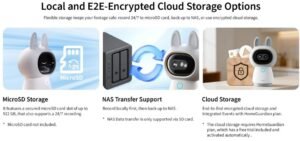
Quick Answer: Local Storage vs. Cloud Storage
Local storage is a good option if you want to avoid recurring cloud storage fees, maintain direct control over recordings, and potentially continue recording during an internet outage.
Cloud storage is a better fit if you want an off-site copy of your footage, convenient remote access, and less responsibility for managing physical storage equipment.
For homeowners who want both advantages, a compatible hybrid system that combines local recording with cloud backup may provide a practical balance.
What Is Local Storage for Security Cameras?
Local storage means that video recordings are saved on a physical storage device rather than being stored exclusively on a manufacturer’s cloud service.
Depending on the camera system, recordings may be saved to:
- A microSD card inside the camera.
- A USB storage device connected to a compatible hub.
- A dedicated home security base station.
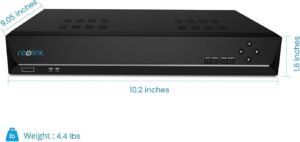
- A Network Video Recorder (NVR).
- A Network Attached Storage (NAS) device.
The simplest option is usually a microSD card. It can be inserted into a compatible camera, allowing it to save video recordings locally.
Larger security systems may use an NVR, which connects to multiple cameras and stores footage on one or more hard drives.
Advantages of Local Storage
1. Fewer Recurring Storage Costs
Many cameras support local recording without requiring a monthly cloud storage subscription.
After purchasing compatible storage hardware, you may be able to record and review footage without paying an ongoing storage fee.
However, the initial camera and storage equipment costs still need to be considered.
2. Greater Control Over Your Recordings
With local storage, recordings remain on devices you manage, such as a memory card or home recorder.
This can give homeowners more direct control over storage capacity, recording schedules, and footage deletion.
3. Recording May Continue During Internet Outages
Some local-storage cameras can continue recording even when the internet connection is unavailable.
This is possible when the camera, power supply, and local storage remain operational.
However, remote viewing and app notifications may stop working until the internet connection is restored.
4. Flexible Storage Options
Local storage ranges from a small microSD card to a larger NVR system.
This allows homeowners to select a solution based on the number of cameras, recording quality, and how much footage they want to retain.
Disadvantages of Local Storage
Local storage is not completely risk-free.
1. Risk of Physical Theft or Damage
If recordings are saved to a memory card inside an outdoor camera, someone who steals the camera may also take the footage.
A local recorder can reduce this particular risk if it is installed in a separate, secure location, but it can still be damaged or stolen.
2. Limited Storage Capacity
A memory card can only store a certain amount of video.
When it becomes full, the camera may overwrite older recordings automatically, depending on its settings.
3. Hardware Maintenance
Memory cards and hard drives can eventually fail.
Homeowners should monitor storage health, use compatible equipment, and periodically confirm that recordings are being saved correctly.
4. Remote Access Depends on the System
Local storage does not automatically mean that recordings are available from anywhere.
Remote playback generally requires a compatible app, an internet connection, and the camera manufacturer’s remote-access service or another supported network configuration.
What Is Cloud Storage for Security Cameras?
Cloud storage works differently.
Instead of keeping recordings only on a device inside your home, the camera uploads supported video clips or recordings to remote servers operated by a service provider.
You can usually access saved footage through a smartphone application or web account.
Depending on the manufacturer and subscription plan, cloud storage may include:
- Recorded motion events.
- Video history.
- Remote playback.
- Downloadable clips.
- Extended recording retention.
- Additional smart detection or notification features.
Not every camera offers the same cloud features, and some services require a paid subscription.
Advantages of Cloud Storage
1. Off-Site Video Backup
One of the biggest advantages of cloud storage is that recordings already uploaded to the provider are stored away from your home.
If an outdoor camera is stolen or damaged, previously uploaded footage may still be available through your account.
This is particularly useful when protecting important recordings from physical damage at the property.
2. Convenient Remote Access
Cloud-based systems are designed to make video access convenient.
You can often open an app, select a camera, and review available recordings while away from home.
The exact functionality depends on the service and your internet connection.
3. Less Physical Storage Management
With cloud storage, the provider manages the remote storage infrastructure.
You generally do not need to install a separate NVR or manage a large hard drive for cloud-based recordings.
4. Flexible Recording History
Some subscription plans allow users to choose different video retention periods.
For example, a service may offer different plans for short-term or extended recording history. Availability and pricing depend on the provider.
Disadvantages of Cloud Storage
1. Recurring Subscription Costs
Many manufacturers charge monthly or annual fees for cloud video history.
If you use several cameras, these costs can become an important part of your long-term security budget.
Always check whether the subscription is charged per camera, per household, or according to another pricing structure.
2. Dependence on Internet Connectivity
Cloud recording generally requires an internet connection to upload footage.
If your connection fails, new recordings may not reach the cloud during the outage unless the camera supports local recording or temporary buffering.
3. Privacy and Account Security Considerations
Cloud storage means that video data is transmitted to and stored within a service provider’s infrastructure.
Before choosing a service, review its privacy policy, encryption practices, account security options, data retention rules, and sharing controls.
4. Service and Plan Limitations
Cloud storage features can depend on the provider’s subscription terms.
If a subscription expires or a service changes its plans, access to recording history and certain features may change.
Read the cancellation and retention policies before purchasing a camera system.
Local Storage vs. Cloud Storage: Side-by-Side Comparison
FeatureLocal StorageCloud StorageRecording locationMemory card, hub, NVR, or NASRemote provider serversMonthly storage feeOften not requiredOften required for extended historyInitial equipment costMay be higherMay be lowerInternet required for recordingNot alwaysGenerally required for uploadingRemote accessDepends on camera and networkUsually through an app or websiteProtection from camera theftDepends on recorder locationPreviously uploaded footage may remain availableStorage capacityLimited by installed hardwareDepends on subscription and providerMaintenanceUser manages hardwareProvider manages cloud infrastructurePrivacy controlDirect control over physical storageDepends on provider policies and securityContinuous recordingDepends on camera and storage systemDepends on camera and service plan
The most important point is that neither option is automatically better in every situation.
A local system can provide reliable recording during an internet outage, but only if the camera and storage device remain powered and operational. Cloud storage can preserve uploaded footage after a camera is stolen, but it cannot protect clips that were never successfully uploaded.
SD Card vs. NVR vs. Cloud Storage
Local storage is not just one technology. There are different ways to save footage inside your home.
1. MicroSD Card Storage
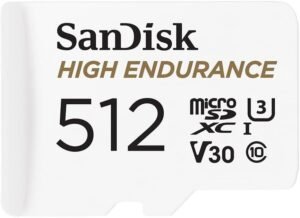
A microSD card is a small memory card installed directly inside a compatible security camera.
Best for: Homeowners with one or a few cameras who want a relatively simple local recording solution.
Advantages:
- Simple installation.
- No separate recording hub required.
- Usually no recurring storage fee.
- Suitable for supported motion-triggered or continuous recording modes.
Limitations:
- Limited capacity.
- Physical theft of the camera may expose the card.
- Card performance and lifespan depend on recording activity.
- Not every camera supports the same card capacities.
For cameras that record continuously, look for a compatible high-endurance memory card designed for repeated video recording.
2. Network Video Recorder (NVR)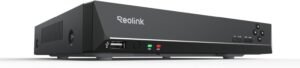
An NVR is a dedicated recording device that stores footage from compatible network cameras.
It can be useful when monitoring multiple areas around a property.
Best for: Homeowners who want a larger camera system or need more recording capacity.
Advantages:
- Centralized video storage.
- Larger storage capacity than a typical microSD card.
- Suitable for multi-camera systems.
- Some configurations support continuous recording.
Limitations:
- Higher initial equipment cost.
- Requires installation and configuration.
- Hard drives need monitoring and may eventually require replacement.
- The recorder itself needs physical protection.
3. Cloud Storage
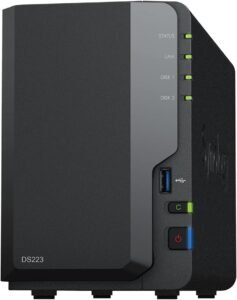
Cloud storage saves footage on remote servers rather than relying only on equipment inside your home.
Best for: Homeowners who prioritize remote video access and off-site recording backup.
Advantages:
- Access recordings through supported apps.
- Previously uploaded footage can remain available after camera theft.
- No need to manage a home recording hard drive.
- Some plans offer extended video history.
Limitations:
- Subscription fees may apply.
- Uploading footage depends on internet connectivity.
- Storage history and features depend on the service plan.
- Requires attention to account security and privacy policies.
What Happens If Your Internet Goes Down?
This is one of the most important differences between the two storage methods.
Imagine that your home internet connection stops working for several hours.
With a compatible local-storage camera, recording may continue because video is saved directly to the memory card or local recorder.
However, you may temporarily lose remote viewing, cloud access, and mobile notifications.
With a cloud-only camera, video uploads may stop until the internet connection returns.
Some camera systems temporarily buffer events or provide additional local recording features, but this behavior varies by model.
Important: Always check the manufacturer’s documentation to understand exactly what happens during an internet outage. The words “local storage” do not guarantee that every camera function will continue working offline.
Which Option Is Better for Privacy?
Privacy is an important consideration when choosing a home security camera.
Local storage can reduce the amount of video that needs to be uploaded to a third-party cloud service. However, it does not automatically make a camera completely private or secure.
A camera connected to your home network can still have cybersecurity risks.
Cloud storage also has privacy considerations because recordings are managed through a provider’s infrastructure.
Before purchasing, consider these questions:
- Does the manufacturer explain how recordings are encrypted?
- Can you enable two-factor authentication?
- Who can access your recordings?
- Can you control how long footage is retained?
- Are recordings shared with third-party services?
- Can you delete recordings and close your account?
- Does the manufacturer provide regular security updates?
A strong password, updated camera firmware, secure Wi-Fi settings, and carefully managed account access are important regardless of storage type.
Is Hybrid Storage the Best Solution?
For some homeowners, the best approach is not choosing between local and cloud storage.
A hybrid system combines local recording with cloud backup or cloud-based access.
For example, a camera may save footage locally to a microSD card while also uploading selected motion events to a cloud service.
This can provide several advantages:
- Local recordings may continue during an internet outage.
- Uploaded footage may remain available if the camera is stolen.
- Users can access selected recordings remotely.
- Important clips may have an additional backup location.
However, hybrid storage is not automatically included with every camera.
Some manufacturers require a subscription for cloud backup, while others offer local and cloud functions separately.
Check the exact camera model and plan before assuming that both options are available.
How to Choose the Right Storage Option for Your Home
Your decision should reflect how you intend to use your cameras.
Choose Local Storage If:
- You want to avoid recurring cloud storage fees.
- You prefer to keep recordings on equipment you manage.
- Your camera supports recording without an internet connection.
- You are comfortable managing memory cards or a recording device.
- You need a local multi-camera recording system.
Choose Cloud Storage If:
- You want recordings stored away from your property.
- You frequently review footage while away from home.
- You prefer not to maintain a physical recording device.
- You are comfortable with the provider’s subscription fees.
- You want convenient access to previously uploaded clips.
Choose Hybrid Storage If:
- You want local recording and off-site backup.
- You need additional protection against physical damage.
- You want flexible access to important recordings.
- Your camera system supports both storage methods.
Frequently Asked Questions
Is local storage better than cloud storage for security cameras?
Local storage is often better for avoiding recurring cloud fees and maintaining direct control over recordings. Cloud storage is often better for off-site backup and convenient remote access. The best choice depends on your priorities.
Can security cameras record without Wi-Fi?
Some cameras can continue recording locally without an internet connection, provided they have power and compatible local storage. However, remote viewing and app notifications may not work until connectivity is restored.
Is cloud storage worth paying for?
It may be worth paying for if you need off-site video backup, extended recording history, or convenient access to footage from multiple locations. If you only need basic local recording, a compatible camera with local storage may be sufficient.
Can someone steal my security camera and take the recordings?
If recordings are stored only on a memory card inside the camera, the card may be taken with it. A separate local recorder or an already-uploaded cloud copy can reduce this risk.
How long can a security camera store video locally?
It depends on storage capacity, video resolution, frame rate, compression, and whether the camera records continuously or only when motion is detected. There is no universal recording duration for every camera.
Do all security cameras require a subscription?
No. Some cameras support local recording without a monthly cloud storage subscription. However, certain advanced features, cloud video history, and additional services may require payment.
What is the difference between an SD card and an NVR?
An SD card stores footage directly inside a compatible camera. An NVR is a separate recording device that can store footage from multiple compatible network cameras, usually with greater storage capacity.
Can I use local and cloud storage at the same time?
Yes, if your camera system supports hybrid storage. Some models can record locally while uploading selected events to a cloud service. Check the manufacturer’s feature list and subscription requirements.
Final Verdict: Local or Cloud Storage?
There is no single storage solution that works best for every home.
Local storage is a practical choice for homeowners who want to reduce recurring costs and maintain direct control over their recordings. Cloud storage is useful when off-site backup and convenient remote access are more important.
For homeowners who want additional protection, a compatible hybrid system may offer the best balance between local recording and cloud backup.
Before purchasing a security camera, check its recording modes, storage capacity, internet requirements, subscription policies, and security features.
The best security camera is not necessarily the one with the highest resolution. It is the one that records reliably, protects your footage, and fits the way you want to monitor your home.

Affiliate Disclosure: HomeSentryUSA may earn a commission when readers purchase products through qualifying affiliate links. As an Amazon Associate, we may earn from qualifying purchases at no additional cost to you. Our editorial content is intended to provide helpful and objective information to support informed purchasing decisions.