Buying a home security camera should not automatically mean signing up for another monthly subscription. Many homeowners want to monitor their front doors, driveways, backyards, and indoor spaces without paying recurring fees just to save or review video recordings.
The good news is that several security cameras offer local storage through a microSD card or built-in memory. This allows you to record and access footage without depending on a paid cloud storage plan.
In this guide, we explore three home security cameras worth considering in 2026: the TP-Link Tapo C120, eufy SoloCam S340, and Reolink Argus 4 Pro. We compare their storage options, video quality, installation requirements, and potential limitations to help you choose the right camera for your home.
Quick Answer: If you want an affordable plug-in camera with flexible indoor and outdoor placement, consider the TP-Link Tapo C120. For a solar-powered outdoor option, look at the eufy SoloCam S340. If wide-angle 4K-style panoramic coverage is your priority, the Reolink Argus 4 Pro is another option to compare.
Why Choose a Security Camera Without a Monthly Subscription?
Traditional cloud-based security cameras often require a paid plan to store recorded clips or access extended video history. These recurring costs can add up over time.
A camera with local storage offers a different approach. Instead of sending every recording to a cloud service, it saves footage to a memory card or compatible storage hub.
Here are some potential benefits:
- No required monthly storage payment: You can access supported local recording features without subscribing to a cloud plan.
- More control over recordings: Your footage can remain on a memory card or storage device in your home.
- Long-term savings: You may avoid recurring cloud storage charges.
- Internet flexibility: Some local recording functions can continue during an internet outage, depending on the camera and network setup.
- More privacy control: Local storage can reduce the need to upload recordings to a cloud service.
However, local storage also has limitations. If someone steals or damages a camera and its memory card, the recordings may be lost. Cloud backup can help protect important footage, but it may require an additional subscription.
Best Home Security Cameras Without Monthly Fees
1. TP-Link Tapo C120 – Best for Flexible Indoor and Outdoor Use
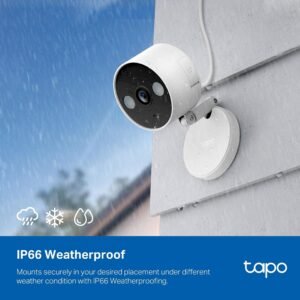
The TP-Link Tapo C120 is a compact Wi-Fi security camera designed for both indoor and outdoor placement. Its combination of local storage, smart detection, and weather resistance makes it an option for homeowners who want flexibility without a mandatory cloud storage subscription.
Key Features:
- 2K+ video resolution.
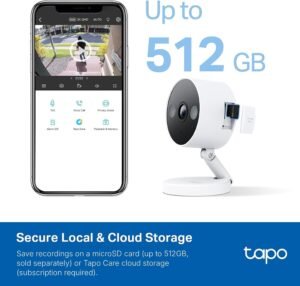
- Local recording with a microSD card up to 512GB.
- IP66 weather resistance.
- Person, pet, and vehicle detection.
- Color night vision with built-in spotlights.
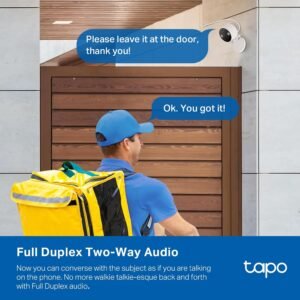
- Two-way audio.
- Compatibility with Amazon Alexa and Google Assistant.
Pros:
- Supports local recording without requiring Tapo Care.
- Can be installed indoors or outdoors.
- Offers several smart detection features without a subscription.
- Supports expandable microSD storage.
Cons:
- A microSD card is sold separately.
- Requires a power connection.
- Cloud storage and certain enhanced notification features require a paid plan.
- Outdoor installation requires a suitable power outlet and cable placement.
Who Should Consider It?
The Tapo C120 is worth considering if you need a versatile camera for a room, entrance, garage, or covered outdoor area and prefer a wired power connection over battery charging.
2. eufy SoloCam S340 – Best Solar-Powered Outdoor Option
The eufy SoloCam S340 is designed for outdoor monitoring and offers a dual-camera system with a solar charging panel. It is particularly interesting for homeowners who want to monitor larger outdoor areas without running a power cable to the camera.
The camera includes built-in local storage, so a monthly cloud storage subscription is not required for its basic local recording functions.
Key Features:
- 3K wide-angle camera and 2K telephoto camera.
- Built-in 8GB local storage.
- Included removable solar panel.
- 360-degree horizontal pan coverage.
- Color night vision.
- Human and vehicle detection.
- Two-way audio.
Pros:
- No mandatory monthly storage fee.
- Solar charging can reduce manual charging.
- Pan-and-tilt coverage helps monitor a wider area.
- Built-in storage means no separate memory card is required for its basic storage setup.
Cons:
- Built-in storage is limited to 8GB.
- Solar charging performance depends on sunlight and installation conditions.
- Battery-powered operation may not provide continuous 24/7 recording.
- Some cloud-related features may require additional services.
Who Should Consider It?
The SoloCam S340 is worth considering for driveways, backyards, and other outdoor spaces where a nearby power outlet is unavailable.
3. Reolink Argus 4 Pro – Best for Wide-Angle Outdoor Coverage
The Reolink Argus 4 Pro is a battery-powered outdoor camera designed to provide a wide panoramic view. Its dual-lens system produces a 5120 × 1440 image, and it supports local recording through a microSD card.
This makes it an option for homeowners who want broad outdoor coverage without relying on a monthly cloud subscription.
Key Features:
- 5120 × 1440 panoramic resolution.
- 180-degree horizontal field of view.
- Supports microSD cards up to 512GB.
- Person, vehicle, and animal detection.
- Rechargeable battery.
- Optional solar panel.
- IP66 weather resistance.
- Two-way audio.
Pros:
- Local recording without a mandatory cloud subscription.
- Wide panoramic coverage.
- Supports large-capacity microSD cards.
- Optional solar charging accessory.
- Useful smart detection features.
Cons:
- Records motion-triggered events rather than continuous 24/7 footage.
- Battery performance depends on activity, settings, and weather conditions.
- The optional solar panel may add to the initial purchase cost.
- Its panoramic image format is different from a standard 16:9 4K image.
Who Should Consider It?
The Argus 4 Pro is worth considering if you want to monitor a wide outdoor area, such as a driveway or backyard, and prefer local storage with battery-powered installation.
Quick Comparison: Which Camera Is Right for You?
FeatureTapo C120eufy SoloCam S340Reolink Argus 4 ProMain useIndoor/outdoorOutdoorOutdoorVideo resolution2K+3K + 2K5120 × 1440Local storagemicroSD up to 512GBBuilt-in 8GBmicroSD up to 512GBPowerWiredBattery + solar panelBattery + optional solarMonthly storage fee required?No for local storageNo for local storageNo for local storageContinuous recordingDepends on power and settingsNot supported as 24/7 continuous recordingMotion-triggered recordingWeather resistanceIP66Weather-resistantIP66
Specifications and available features can vary by model version, region, and firmware. Check the exact product listing before purchasing.
What to Look for When Buying a Security Camera Without a Subscription
Before choosing a camera, consider more than its resolution or advertised features. The storage method, power supply, and recording capabilities can make a significant difference in everyday use.
1. Local Storage Capacity
Check whether the camera supports a microSD card, built-in memory, or a separate recording hub.
A larger storage capacity can help retain more footage, but the actual recording time depends on video resolution, compression, recording settings, and activity levels.
2. Recording Type
Not every camera records continuously.
Some battery-powered cameras save footage only when motion is detected. Plug-in cameras may offer continuous recording, depending on the model and configuration.
If you need a complete recording history, check this feature before purchasing.
3. Night Vision
Night vision is important for monitoring entrances and outdoor areas after dark.
Some cameras use infrared night vision, while others use spotlights to provide color night footage. Consider the lighting conditions around your property when comparing these options.
4. Motion Detection and Smart Alerts
Basic motion detection can generate alerts whenever movement occurs. More advanced detection may identify people, vehicles, or animals.
Check which detection features are included for free and which require a paid service.
5. Power Requirements
Choose a power system that suits the installation location.
- Wired cameras are useful near available power outlets.
- Battery-powered cameras offer more installation flexibility.
- Solar-powered options can reduce charging requirements but depend on sunlight and placement.
6. Weather Resistance
For outdoor installation, check the camera’s IP rating and the manufacturer’s installation instructions.
A weather-resistant camera is not necessarily suitable for every exposure condition. Consider direct rain, dust, temperature, and the position of the power connection.
Local Storage vs. Cloud Storage: Which Is Better?
Neither option is perfect for every household.
Local storage is useful if you want to avoid recurring fees and keep recordings on hardware you control. However, footage may be lost if the camera or storage device is stolen or damaged.
Cloud storage provides off-site backup, which can be useful if a camera is removed or damaged. However, extended recording history and other cloud features may require a monthly or annual payment.
For many homeowners, the best choice depends on their priorities: lower ongoing costs or off-site backup and convenience.
Frequently Asked Questions
Can security cameras work without a monthly subscription?
Yes. Many cameras support local recording through a microSD card, built-in memory, or a compatible storage hub. Basic recording and playback may work without a paid cloud plan.
Which security camera does not require a subscription?
The TP-Link Tapo C120, eufy SoloCam S340, and Reolink Argus 4 Pro all offer local storage options that do not require a mandatory monthly cloud storage subscription for basic local recording.
Do security cameras without subscriptions need Wi-Fi?
Not always. Some cameras require Wi-Fi for app access, remote viewing, and notifications, while certain wired recording systems can operate on a local network without internet access. Check the specific model’s requirements.
Can I watch recordings without paying for cloud storage?
Yes, if your camera supports local recording and playback without a paid plan. You may need to install and format a compatible microSD card or configure a storage hub.
Is local storage safer than cloud storage?
It depends on the situation. Local storage gives you more direct control over recordings, but the camera or memory card could be stolen or damaged. Cloud storage keeps a separate copy off-site but introduces account, privacy, and subscription considerations.
Do all camera features work without a subscription?
No. Some manufacturers reserve cloud video history, rich notifications, or additional services for paid plans. Always review the feature list for the exact camera model.
Final Verdict: Which Camera Should You Choose?
The best home security camera without monthly fees depends on where you plan to install it and how you want to store recordings.
- Choose the TP-Link Tapo C120 if you want a flexible plug-in camera with local microSD storage.
- Choose the eufy SoloCam S340 if you prefer a solar-powered outdoor camera with built-in storage.
- Choose the Reolink Argus 4 Pro if wide panoramic outdoor coverage and expandable local storage are your priorities.
Before buying, confirm the exact model, storage compatibility, power requirements, and which features remain available without a subscription.
A camera with local storage can be a practical way to monitor your home while avoiding recurring cloud storage costs.
Affiliate Disclosure: HomeSentryUSA may earn a commission when readers purchase products through qualifying affiliate links. As an Amazon Associate, we may earn from qualifying purchases at no additional cost to you. Our recommendations are based on publicly available product information, and affiliate relationships do not determine our editorial conclusions.
